How to calculate bond values using bond mode in the BAII Plus calculator

How to calculate bond values using bond mode in the BAII Plus calculator
CFA FRM FIXED INCOME
Bond calculations are essential for analyzing fixed-income securities. This tutorial will guide you through using the BA II Plus’s bond mode to calculate bond price, yield, accrued interest, and modified duration.
I. Accessing the Bond Mode:
Let’s first open BA II Plus Online as a reference:
Press 2nd then 9: This accesses the BOND function.
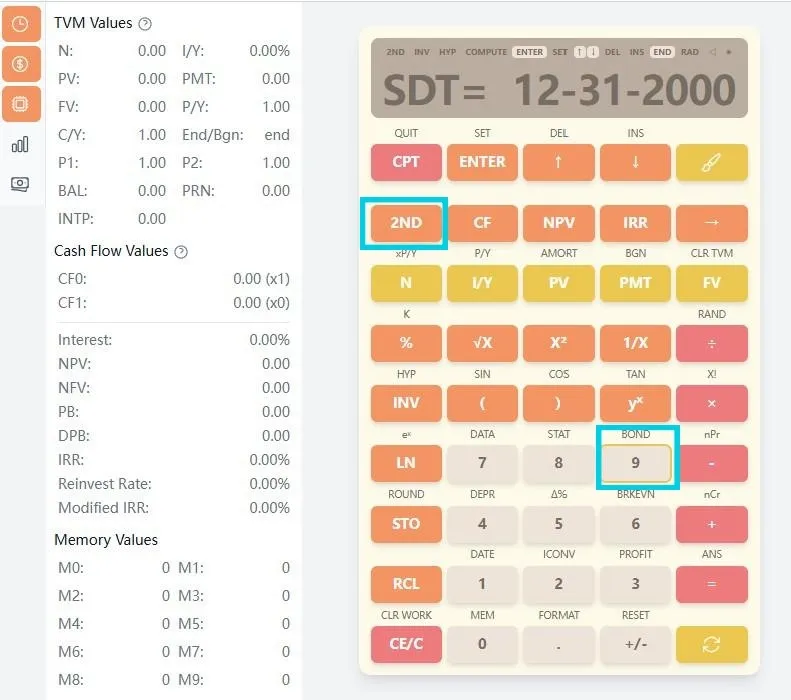
II. Understanding Bond Variables:
The bond mode includes the following variables that you can navigate using the up/down arrow keys:
- SDT (Settlement Date): The date when the bond is purchased or sold
- CPN (Coupon Rate): The annual coupon rate as a percentage
- RDT (Redemption Date): The maturity date when the bond is redeemed
- RV (Redemption Value): The value at redemption (usually 100 for par value)
- DAYS: Day count method (ACT for Actual/Actual or 360 for 30/360)
- CPY: Coupons per year (2/Y for semi-annual, 1/Y for annual)
- YLD (Yield): Yield to maturity (can be calculated)
- PRI (Price): Bond price per $100 of par value (can be calculated)
- AI (Accrued Interest): Interest accrued since last coupon payment
- ModDur (Modified Duration): Price sensitivity to yield changes
III. Inputting Bond Data:
Date Format:
Enter dates in MM-DD-YYYY format (US) or DD-MM-YYYY format (EUR) depending on your calculator settings.
Navigation:
Use ↑ and ↓ arrow keys to move between variables.
Setting Day Count Method:
When on the DAYS variable, press 2nd + ENTER to toggle between ACT (Actual/Actual) and 360 (30/360) methods.
Setting Coupon Frequency:
When on the CPY variable, press 2nd + ENTER to toggle between 2/Y (semi-annual) and 1/Y (annual).
IV. Example Calculation:
Let’s calculate the price and yield for a bond with the following characteristics:
Bond Parameters:
- Settlement Date: June 12, 2024
- Coupon Rate: 6.3% annual
- Redemption Date: December 31, 2024
- Redemption Value: 100 (par value)
- Day Count: Actual/Actual
- Coupon Frequency: Semi-annual (2/Y)
- Known Yield: 8.5%
Step-by-Step Input:
-
Enter Bond Mode: Press 2nd then 9
-
Input Settlement Date:
- SDT= will be displayed
- Enter: 06-12-2024
- Press ENTER
-
Input Coupon Rate:
- Press ↓ to navigate to CPN=
- Enter: 6.3
- Press ENTER
-
Input Redemption Date:
- Press ↓ to navigate to RDT=
- Enter: 12-31-2024
- Press ENTER
-
Set Redemption Value:
- Press ↓ to navigate to RV=
- Enter: 100
- Press ENTER
-
Set Day Count Method:
- Press ↓ to navigate to DAYS
- Ensure it shows “ACT” (if not, press 2nd + ENTER)
-
Set Coupon Frequency:
- Press ↓ to navigate to CPY
- Ensure it shows “2/Y” (if not, press 2nd + ENTER)
-
Input Known Yield:
- Press ↓ to navigate to YLD=
- Enter: 8.5
- Press ENTER
-
Calculate Price:
- Press ↓ to navigate to PRI=
- Press CPT
- Result: The calculator will display the bond price (approximately 98.56)
V. Viewing Additional Results:
After calculating the price, you can view other automatically calculated values:
- Accrued Interest: Navigate to AI= to see the accrued interest (approximately 3.15)
- Modified Duration: Navigate to ModDur= to see the duration (approximately 1.44)
VI. Calculating Yield from Price:
To calculate yield when you know the price:
- Navigate to PRI= and enter the known price
- Press ENTER
- Navigate to YLD=
- Press CPT
- The calculator will display the yield to maturity
VII. Important Notes:
Day Count Conventions:
- ACT/ACT: Uses actual number of days in periods and year
- 30/360: Assumes 30-day months and 360-day years
Coupon Frequency:
- 2/Y: Semi-annual coupons (typical for US corporate and government bonds)
- 1/Y: Annual coupons (typical for some international bonds)
Price Convention:
Bond prices are quoted per $100 of par value. A price of 98.56 means the bond trades at 98.56% of its par value.
Accrued Interest:
Represents the interest that has accumulated since the last coupon payment. The buyer pays this to the seller in addition to the quoted price.
VIII. Clearing Bond Mode:
After completing your calculations, you can:
- Press refresh to reset all values
- Or simply exit bond mode by pressing another mode key
IX. Practical Applications:
Bond mode is particularly useful for:
- Portfolio Management: Calculating current values of bond holdings
- Investment Analysis: Comparing yields across different bonds
- Risk Assessment: Using modified duration to estimate price sensitivity
- Exam Preparation: CFA and FRM candidates frequently use these calculations
This comprehensive guide provides you with the knowledge to effectively use the bond mode on your BA II Plus calculator. Practice with different bond scenarios to become proficient in fixed-income analysis. Remember that bond calculations can be complex, so always double-check your inputs for accuracy.
Replies (0)
Sign in to reply to this post.